---
title: "Email search in webmail.ee"
canonical_url: "https://www.zone.lv/help/kb/email-search-in-webmailee/"
post_type: "ht_kb"
published: "2024-04-30T06:33:14+00:00"
modified: "2025-06-03T11:22:36+00:00"
language: "en"
author: "silver"
taxonomies:
ht_kb_category:
- name: "Webmail.ee"
url: "https://www.zone.lv/help/kb-categories/webmailee-en/"
ht_kb_tag:
- name: "keyword search"
url: "https://www.zone.lv/help/kb-tags/keyword-search/"
- name: "search"
url: "https://www.zone.lv/help/kb-tags/search/"
- name: "webmail"
url: "https://www.zone.lv/help/kb-tags/webmail/"
- name: "webmail.ee"
url: "https://www.zone.lv/help/kb-tags/webmailee-en/"
---
# Email search in webmail.ee
On this page, we gather all useful tips and tricks related to webmail.ee search.
Webmail.ee’s text search is [FULLTEXT](#FULLTEXT) index from the beginning of the letter to 1024 bytes (without punctuation marks).
Clicking on the arrows in the Search keywords column opens more detailed instructions with examples.
### Search parameters
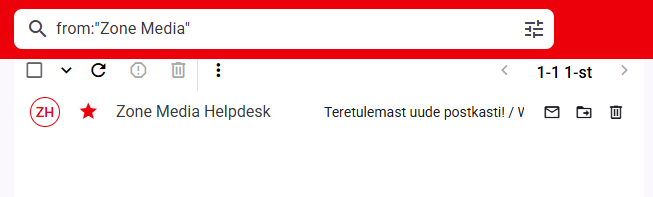
Search parameterSearch keywordsSender`from:`You can search by sender using `from:email`, `from:"Displayed name"` or `from:domain name`. It’s worth noting that a quote-separated sender search will search for emails LIKE “%name1 name2%”, i.e. it will also display emails with a header such as “name1 name2 name3”. Example:
[](https://www.zone.lv/static/sites/5/webmail1-1.png)
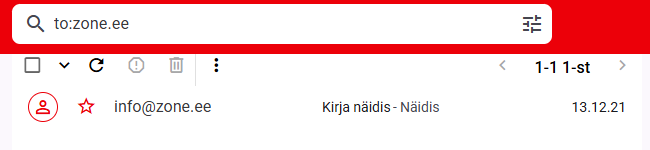
Recipient`to:`**to:** when searching by parameter, emails are searched in both the **to**: and **cc**:
Use `to:email`, `to:"Displayed name"` or `to:domain name` to search by recipient. It is worth noting that when searching for a recipient separated by quotation marks, emails are searched on the basis of **LIKE** “%name1 name2%”, that is, emails with the title “name1 name2 name3” are also displayed. For example:
[](https://www.zone.lv/static/sites/5/webmail2-1.png)
Subject`subject:`Use keyword `subject:`to search by subject. If you want to search for a more precise phrase in the subject, separate the phrase with quotation marks `subject:"word1 word2"`. The principle of searching for a partial match, i.e. **LIKE** “%word1word2%” also applies to the search by title, and the result also displays letters with the title, for example, “123word1word21”.
Date/period`older:YYYY-MM-DD`
`before:YYYY-MM-DD`
`newer:YYYY-MM-DD`
`after:YYYY-MM-DD`When searching by date or period, you must enter the date in the format **`Year-month-day`**
To search for messages sent/received after a certain date, use keywords `newer:YYYY-MM-DD` or `after:YYYY-MM-DD`.
To search for messages sent/received before a certain date use keywords `older:YYYY-MM-DD` or `before:YYYY-MM-DD`
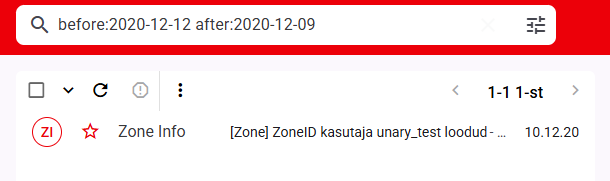
To select a specific period, combine them by entering the start and end date of the period you are looking for:
[](https://www.zone.lv/static/sites/5/webmail3-1.png)
Additional information For convenience, the period parameter can also be set to **today** and **yesterday**, for example before:today ja after:yesterday.
Starred/flagged `is:starred`Read `is:read`Not read `is:unread`Emails with attachments`has:attachment`If you want to find emails with attachments, add a following keyword to the search `has:attachment`
Email size`minSize:`
`maxSize:`For example, to search for all messages larger than 10MB, add to search `minSize:10MB` and to search all messages less than 10MB in size `maxSize:10MB`.
Specific folder`in:`By default, mail is searched in all folders except Junk and Trash folders. To search for messages in a specific folder, use a keyword `in:folder name`, e.g.: `in:Trash`
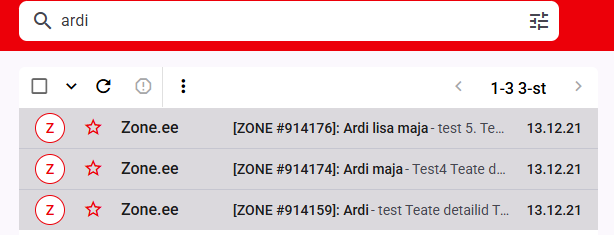
Exact word`string`The plain text search will only display emails with a specific, unchanged word/string:
[](https://www.zone.lv/static/sites/5/webmail4-1.png)
Exact phrase`"Phrase"`To search for a phrase, put the search keywords in quotation marks:
[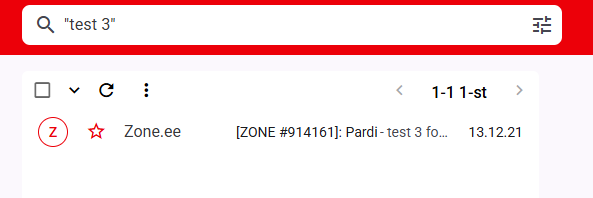](https://www.zone.lv/static/sites/5/webmail6-1.png)
Otherwise, all words are searched for separately:
[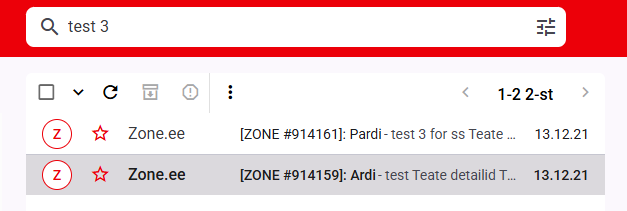](https://www.zone.lv/static/sites/5/webmail5-2.png)
Remove word from results`-string`If you want to find emails with a specific string, but want to remove emails containing a different string from the search, use `-string`, e.g.:
[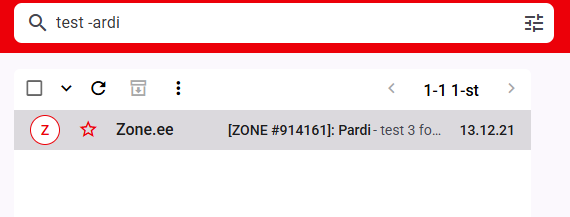](https://www.zone.lv/static/sites/5/webmail7-1.png)
Combined search`search keywork:string search keywork:string`In Webmail.ee, emails can be searched by combining the full text with a supported keyword search, separated by a space:
[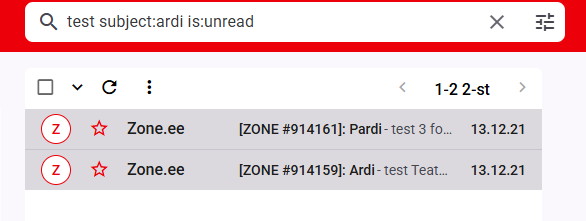](https://www.zone.lv/static/sites/5/webmail8-1.png)
### Technical
Additional information FULLTEXT index is an index type used in MySQL databases to handle full-text queries. A full-text query is a SQL Server function that supports full-text queries against character-based data. This type of query can contain words and phrases and other forms of those words or phrases.
For example, if the indexed text contains the phrase “tables may contain indexes”, the full text register will contain four characters: `tables`, `may`, `contain` and `indexes`. As the keyword list can be easily searched, full-text queries can quickly find the records they need.
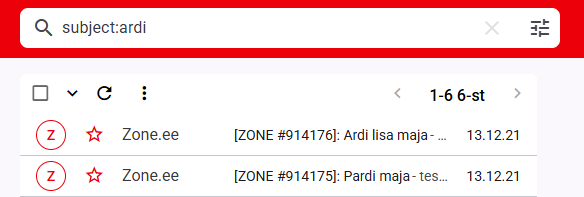
**Subject**, **from**, **to** keyword searches return partial matches, or in essence, a search `from:ardi` means that you are searching **LIKE** “%ardi%”, i.e. you may also find “pardi”, “kaardimaja”, etc. in the results:
[](https://www.zone.lv/static/sites/5/webmail9-1.png)
Attention! Unfortunately there is no AND search support in the content of the email. Only phrase search is supported. If you want to find emails that definitely contain specific words, each word must be separated by quotation marks.
Example[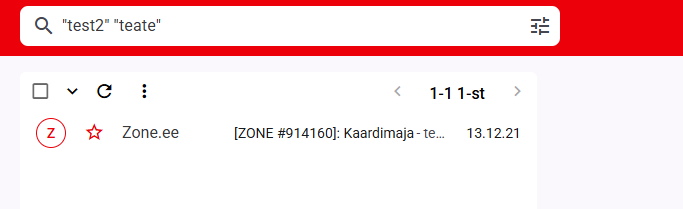](https://www.zone.lv/static/sites/5/webmail10-1.png)
### Searching for emails in a large mailbox
If you have tens or hundreds of thousands of emails in your inbox, a search on a single parameter can be very long. To avoid this, it is recommended to use [more specific parameters](#TABEL).